For developers
APEX
The developer API.
Test your vision model against the conditions you describe, from your own pipeline. APEX gives developers programmatic access to Yrikka's data generation, testing and adaptation.
How an evaluation runs
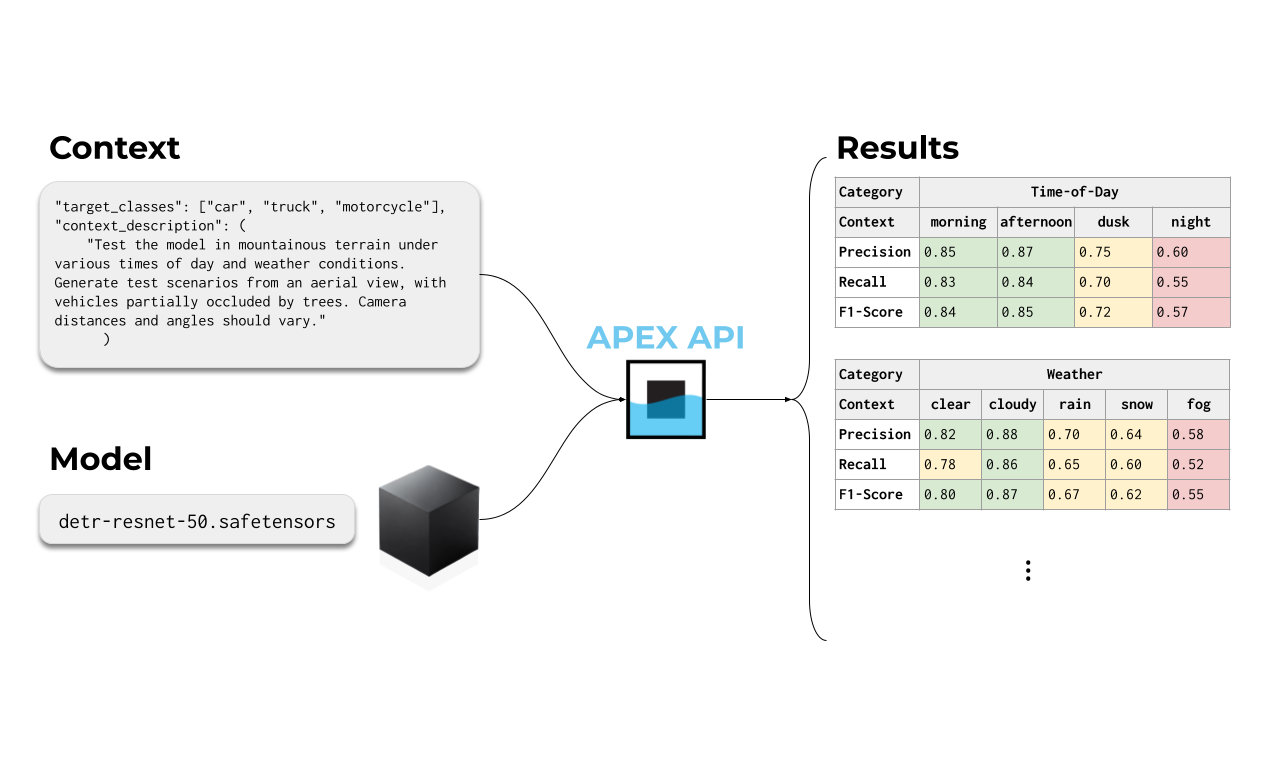
Describe the conditions. Submit the model. Get results by condition.
Write the test scenario in plain language and list your target classes. APEX generates matching test imagery, runs your packaged model against it, and returns precision, recall and F1 for each condition, so you can see exactly where performance drops.
- 01Upload
Request a presigned URL and upload your model package.
- 02Submit
Send the target classes and a context description. You get a job ID back.
- 03Review
Poll the job status and retrieve aggregate and per-condition metrics.
Start with the quickstart.
The official repository contains the current setup instructions and examples. API access requires an account with available credits; requests without sufficient credits return an authorization error.
Open the GitHub quickstart- 01Review the examples
Check the current repository for installation, authentication, and request examples.
- 02Confirm access
Contact Yrikka to confirm account access and credits for your evaluation.
- 03Scope your workflow
Discuss data, output, and integration requirements before connecting a production pipeline.
Work with Yrikka
Bring us your mission.
We’ll show you the workflow.
Walk through your data, model, and operational challenge with the team building ORION and ATLAS.